Organize, search, and edit your recipes
Updated
Collections
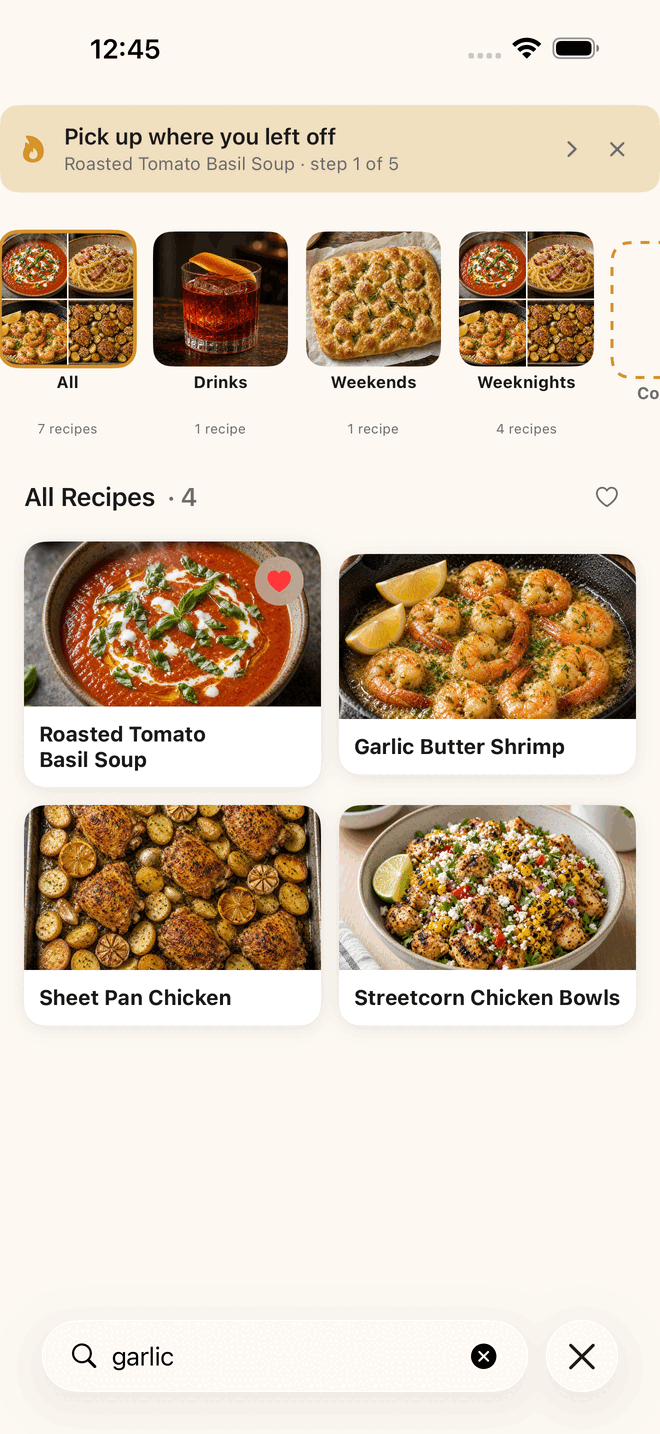
Sort recipes into collections, like “Weeknight Dinners” or “Date Night.”
- To add a recipe to one, open it and choose Add to Collection.
- To make a new one, choose Create New Collection and name it.
- Your collections are listed under My Collections.
- To take a recipe out of one, choose Remove from Collection.
Favorites
Mark a recipe as a favorite to find it quickly.
Search
Search looks at titles, tags, and ingredients. Type “chicken” and you get every recipe with chicken in it.
Notes
Add your own notes to any recipe under My Notes.
Edit a recipe
Open the recipe’s menu and choose Edit to change the title, ingredients, steps, description, or photo. You can add a photo, change it, or remove it.
Delete a recipe
Open the recipe’s menu and choose Delete Recipe. Feastmark asks you to confirm.
Share a recipe
Open the recipe’s menu and choose Share Recipe to send it to someone.
Common questions
Can I search by ingredient?
Yes. Search looks at ingredients and tags as well as titles, so typing chicken finds every chicken recipe.
Still stuck?
Support comes from Big Beard Apps, the studio behind Feastmark.
Contact support